Maps in Bolivia
Diplomats are crazy about maps, and I am no exception. So if this post seems over the top, please chalk it up to my profession and just use what you find useful.
My own preferences in maps, though I love them all, are topo maps and my GPS. When I’m at home, Google Earth and Google Maps do a wonderful job. However, OziExplorer is also an incredible piece of software for working with maps, and I use the new Garmin Software, BaseCamp, which can be downloaded free of charge, to work with my GPS. Other good software you might want to get is GPSBabel and, perhaps, Bentley View V8i, both of which are also free. I’ll run through all these programs and give you a clue what they can help you with and why you might want to use them, after discussing the maps.
There are lots of maps available in Bolivia. Many paper maps are given away for free. Most of them are not worth the paper they are printed on. That said, excellent maps are available, and some of the best can be downloaded free-of-charge on the internet.
For Your GPS
 First, you will want to feed your GPS. I won’t review what GPS you should buy for Bolivia, since the only one I have ever used is Garmin. That said, what I can say about Garmin is that it is a standard, with which most everyone tries to be compatible. That is a huge advantage. I use a Garmin eTrex Vista HCx, which is a wonderful little device. They have recently been discontinued by Garmin, so you could probably get one cheap. That said, there are good reasons for the discontinuation, I suppose. Some of the new models, besides their larger screens and greater capacity and accuracy, actually have facilities for you to put your own scanned topo maps onto them. I haven’t used those facilities, but the idea certainly seems intriguing.
Anyway, to get back to what I do know something about . . .
 Open Street Map: The Free Wiki World Map
Garmin does not sell any maps of Bolivia (that I am aware of), so you have to find someone else to provide maps for use in your GPS. I have been using an implementation of Open Street Map (OSM). It’s a very cool wiki-map thing. Basically, anyone can register and then edit the map. I have added a fair amount to it and obviously there are a number of people doing the same, as I see it getting better day by day. There is a lot missing still, but it’s definitely a worthwhile start.
Of course, you can’t use OSM directly in your GPS device. Luckily, some people, or some groups of people, are already preparing the maps for your use. There are several alternatives, depending on what you want. You can see some of the other possibilities on an older page in this blog, Using a GPS in Kyrgyzstan (or anywhere). Right now, though, I will focus on the one option I use. This gives you a routable map using Latinized names.
 Detail from the Open Street Map of La Paz, showing the U.S. Embassy and the Estado Mayor, where the Instituto Geographico Militar is located
Free maps for Garmin brand GPS devices from OpenStreetMap does a great job of generating the map you want directly from the OSM site, on order. It can have whatever coverage you want, and it is spectacularly easy to use. Even better, I hardly need explain how to use it, since the instructions are right there on the webpage for you to read. You select the tiles you want, and enter your email address. The site will then email you a link to a page from which you can download the map you generated.
As I said above, some newer GPS units may be able to take scanned maps. Mine can’t, so I can’t tell you much about that. I understand that the Instituto Geografico Militar (IGM or Military Geographic Institute of Bolivia) is working on digitizing topographical maps of Bolivia for use in GPS’s, so you may want to contact them, as well (see below). I will provide more information on that when I get it.
 West Side of Tata Sajama, detail from IGM’s pdf version of its 1:50k topo, available online
Digital (or digitized) Maps
There are a couple of options online. By far, the most interesting is the website of the Instituto Geografico Militar, at http://www.igmbolivia.gob.bo/. The Instituto is moving quickly to put new products up online. They now have topographic maps in .pdf format at standard scales of 1:250,000, 1:100,000, and 1:50,000. They also continue to have available the 1:250,000 in .dgn format, a CAD (computer assisted design) format. All of Bolivia is covered in the 1:250k scale. While coverage is pretty good in the 100k and 50k maps, it is by no means complete, so you need to use all these scales to get full coverage of the country.
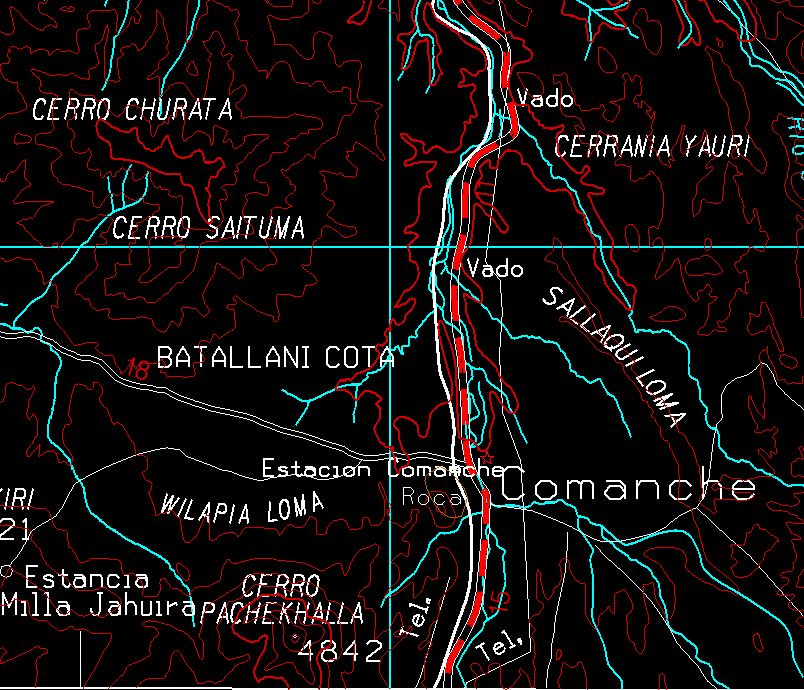 Comanche, detail from a 250k .dng file available for free on the IGM website – so what’s the scale on this map now?
Of course, one of the oddities of mapping digitally is the obsolescence of the whole idea of issuing maps in different “scales.” By zooming in and out, a digital map can be re-scaled on the fly on your computer or your GPS. So, what the scale on these pdf versions really means is that they vary in their level of detail, with the 250k maps much less detailed than the 50k maps. However, that idea breaks down with the very interesting .dgn maps. These are highly detailed. Of course, you need to get a specialized program, capable of viewing a CAD file, to see these, and that is where Bentley View V8i comes in. From Bently View, you can view, zoom, print, or convert to PDF. These files have much more information than the 250k .pdfs on the site. In fact, I should compare them to the 50k’s one of these days. I suspect that they are equally detailed, except possible in terms of elevation lines. That does mean that generating a pdf from a complete 250k map creates an almost illegible mess. However, zooming in and generating something like a 50k map is much more useable.
The other site, previously my go-to site for free maps of Bolivia, is the Perry-Castañeda Library Map Collection on the website of the University of Texas in Austin. The Bolivia Maps are available for downloading at http://www.lib.utexas.edu/maps/bolivia.html. Besides a variety of country maps, and some maps of La Paz, dating to the 1990s, you can find aeronautical charts at 1:1,000,000 and 1:250,000. The former has full coverage for Bolivia, and the later has most of Bolivia covered. Almost all of Bolivia is covered in the 1:100,000 topographical maps, and there are four lonely 1:50,000 topos. All of these are old, and the dates vary, so I suggest you make a point of looking at the dates and consider the possibility that roads, and some other features, may have changed since the maps were made.
Which Map(s) Do You Need?
With so many maps available, it can be difficult to find the topo map(s) you need, especially since the keys and guides for these maps (at least those provided online) are terrible. However, I’ve found a website to solve the problem. Try out http://www.geospatial.com/. They have an interactive map for finding maps. You zoom in and then select the area that interests you, and they will give you a list of all the maps they are aware of covering the area. There will be a lot of “chaff” in there, in the form of British and Russian nautical charts, Soviet Military maps and other assorted oddities, but you should find the IGM’s 50k series right at the top and other IGM maps scattered among the chaff as you scroll down. After you know what you need, it’s easy to go over the the IGM site and download it.
Paper Maps
As much as I enjoy the modern, digital maps, there is nothing quite so satisfying as spreading your paper map(s) out on a big table and planning your next trip. For that purpose, the Instituto Geografico Militar can’t be beaten. You can visit them at the Estado Mayor General, Av. Saavedra #2303, or call them at the phone numbers on their site. They have a very modern, computerized system, and can find the map you want, and print it out on their plotters, for a pretty reasonable price. Definitely recommended. I have not yet explored whether they have the maps that are missing on their website, but my understanding is that full coverage of the country at the more detailed 100k and 50k scales is simply not available.
I’ve seen other good paper maps, but have not found them for sale. Someone is producing hiking maps with coverage of the main hiking areas of the country, and from what I have seen they look pretty good. I purchased a couple of maps from the series “Rutas de Viaje/Journey Routes FOV,” but was not impressed. Although the map sheets are pretty big, much of the space is taken up by advertising and text and the maps themselves are not that impressive.
Software
As I noted above, I use a number of software applications for mapping.
Google Earth and Google Maps are great for generally exploring around and getting an idea of what is where. You can also create a route in Google Earth and export it for use in your GPS, or open .gdb or .gpx files (among others) in Google Earth to review them against the map. Google Earth does a fair job of searching for locations. Google Maps can sometimes find a place that won’t come up in Google Earth. Another way to search for a location or a feature is to go to Panoramio and search for a photo. Since the photos on Panoramio all have geographical information attached and are displayed against a map, if you can find a photo of what you are looking for on Panoramio, you can get the latitude and longitude of the place where it was taken for use in finding it on your maps.
I haven’t spent much time with Garmin’s new software, BaseCamp, but I used its predecessor, MapSource, extensively. BaseCamp is free, and seems to make a good interface for the GPS. OSM maps load into it just like they did with MapSource, and once you have good maps in it, it is a reasonably useful trip planning tool, as well.
OziExplorer is about the most interesting piece of mapping software I have found. You can import any map you can get in a .jpg format – scans of topo maps, for example, or conversions from .pdf files (like the maps on the IGM website). Then, as long as you have the information on latitude and longitude, you can enter it and have a map where you can plot your gps routes and tracks, or plan your next trip. It can interact directly with your Garmin GPs, or even become a real time gps of itself, if you put it on a laptop, teathered to a gps, and take it into the field. About the only thing it can’t do (sigh) is upload your topos onto your gps. This is commercial software, with a price tag of $109, but great commercial software. Take a look at the index feature, as well. As you put your maps into OziExplorer, it can create an index page showing the locations of all your maps on a less detailed map. you can zoom in by going to the more detailed maps, which can also be shown as indexes for the still more detailed maps. If you have a large collection of digital maps, this is an easy way of keeping track of them (once you carry out the time intensive work of getting the maps correctly calibrated).
Other Software Tools
One problem with digital cartography is the multiplicity of formats for all the different software. As a result, you are likely to need some conversion utilities. I regularly use GPSBabel to convert between .gdb .gpx .kml and other formats gps information comes in. PDF Converter makes it easy to convert .pdf files to .jpg files, though I wish you could convert them in batches. And if you really get into Open Street Map, you will eventually want to get JOSM, the premiere OSM editor. Personally, though, I found the learning curve on JOSM to be fairly steep. And then, one easy cheat to put anything you can show on your screen into .jpg format very easily is the Snipping Tool found in the Accessories Menu under Windows. As stated above, I use Bentley View V8i to review and convert the very interesting IGM .dgn maps. I’m not that happy with the results from Bentley View, though, and continue to look for something else.
If you have other/better information on maps in Bolivia or software, please share in the comments below.
Posted: March 2nd, 2013 under Bolivia, Google Earth, GPS, Mapping, South America.
Tags: Bolivia, Google Earth, GPS, Mapping
Comments
Pingback from Larry Memmott's Blog » Upgrading to a Garmin Oregon GPS–Yes, Do It
Time June 3, 2013 at 7:56 pm
[…] get a scan of onto your GPS (with some limitations, more on that below). In Bolivia, where the Instituto Geographico Militar has put its whole collection online, that is a real bonanza. And the facility works well, with the following […]
Pingback from Larry Memmott's Blog » Cordillera de Sama Biological Reserve (Reserva Biológica Cordillera de Sama)
Time October 22, 2013 at 8:09 am
[…] To get to the reserve, turn south from the main road to Tarija at 180 miles from Potosi, or 30 miles from Tarija. Turn left (East) at Laguna Pujzara, about 25 miles from the last turn. The albergue is another four miles. Here is the usual file for use in your GPS or in Google Earth. The 1:50,000 topo map 6528-I Yunchara covers the central part of the reserve (see my maps page). […]
Write a comment
You need to login to post comments!
Pingback from Larry Memmott's Blog » Tinku Territory (Sucre to Oruro)
Time April 21, 2013 at 11:59 am
[…] as the roads have changed over the years and some of the maps have not kept up. Check out the maps page for information on obtaining these maps, all of which can be downloaded for […]